
小狼毫输入法-中文使用英文标点符号
1.前言
一般在写代码的时候,有时可能会出现要写中文的情况,或要写注释或文档时,
如果忘记切换中英文,就会造成代码错误,比如常见的;.'->'等.
以前我也使用过自动切换输入法的工具,但是效果不太理想.
干脆一刀切,直接禁用中文标点符号(半角)
2.设置
我使用的是小狼毫输入法
-
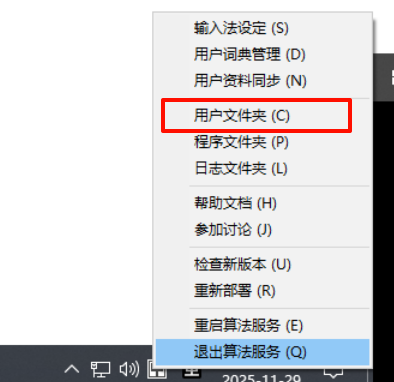
系统右下角,右键选择
用户文件夹
-
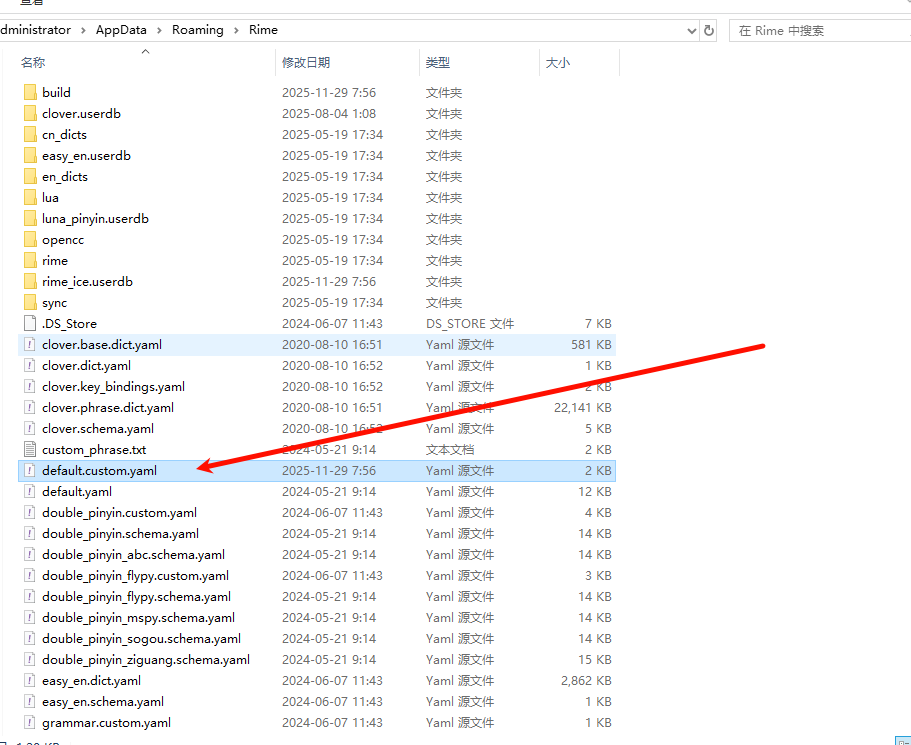
找到
default.custom.yaml配置文件,打开
-
在
patch:下输入以下配置,意思是:始终用英文符号"punctuator/full_shape": false "punctuator/half_shape": true -
但是,有时候又想用中文符号,所以我们要添加一组快捷键,来切换使用中英标点符号
- 先声明全角开关(决定状态是否可切换)
加在patch:下
switches: - name: full_shape reset: 0 states: ["半角", "全角"]-
添加快捷键,如Control+Shift+F
在"key_binder/bindings"最后加一行,即可- { accept: "Control+Shift+F", toggle: full_shape, when: always }
- 先声明全角开关(决定状态是否可切换)
-
这样修改完毕后,保存.最终配置如下
customization: distribution_code_name: Weasel distribution_version: 0.17.4 generator: "Rime::SwitcherSettings" modified_time: "Mon Aug 4 01:09:10 2025" rime_version: 1.13.1 patch: "punctuator/full_shape": false "punctuator/half_shape": true switches: - name: full_shape reset: 0 states: ["半角", "全角"] "ascii_composer/good_old_caps_lock": true "ascii_composer/switch_key": Caps_Lock: commit_code Control_L: noop Control_R: noop Shift_L: commit_code Shift_R: commit_code "key_binder/bindings": - {accept: Tab, send: "Shift+Right", when: composing} - {accept: minus, send: Page_Up, when: paging} - {accept: equal, send: Page_Down, when: has_menu} - {accept: comma, send: Page_Up, when: paging} - {accept: period, send: Page_Down, when: has_menu} - {accept: bracketleft, send: Page_Up, when: paging} - {accept: bracketright, send: Page_Down, when: has_menu} - {accept: "Control+Shift+4", toggle: simplification, when: always} - {accept: "Control+Shift+F", toggle: full_shape, when: always} "menu/page_size": 9 schema_list: - {schema: rime_ice} "switcher/hotkeys": - "Control+grave" -
再重新点击 重新部署就可以.

3.总结
就算在中文状态下,标点也都是英文(半角),当然写这篇笔记的时候,我用的也全都是半角.
想使用中文标点符号(全角),可以使用快捷键 Ctrl+Shift+F键切换.
Comments NOTHING